
 PlyMac · 2026
Your apps forget what you were thinking. Ply doesn’t.
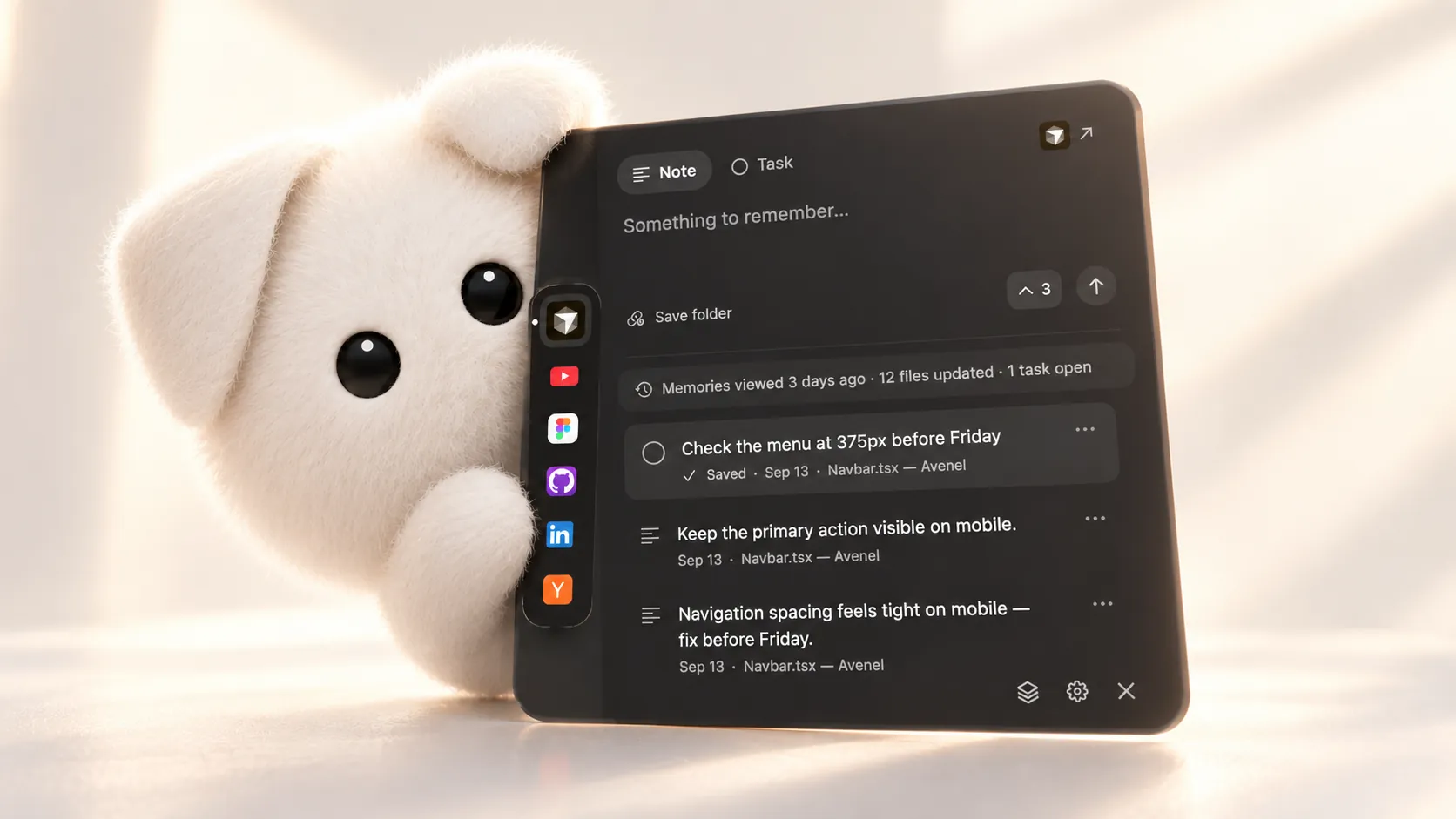
Ply is a Mac app that keeps a thought with the work it is about. A note written on a product page, a design file or a chat stays attached to that place, and comes back when you do.
I designed and built it, and it is the app I open every day.
The problem
A notes app is somewhere you go. The thought belongs where you were.
Most capture tools ask you to leave what you're doing, file the thought somewhere else and remember later where you put it. The context, the exact listing, file or conversation, is lost in the move.
Ply turns that around. It stays with the work itself: what you capture is attached to the app, site or project it came from, comes back when you return, and helps you finish it.
A notes app
- Somewhere you go
- You file the thought away
- The context stays behind
Ply
- Stays with the work
- Attached to the place it came from
- Comes back when you do
The landscape
Retrospective analysisWritten in November 2026 from the shipped work and the project record, not from original project notes.
Mac capture tools are places you go. Only Apple's Quick Note tries to come back to you.
I compared Ply with the tools people already use to catch a thought on a Mac. Most are quick to open and then file the thought somewhere else.
Apple's Quick Note is the closest idea: it can link a note to a Safari page and show it again when you return. Things can capture a link to the page or email you're in. Ply takes the idea to every app, site and folder, and adds tasks and reminders to it.
What it holds

Where the note lives
- This project
- Direct competitor
- Adjacent tool
- Point at a product for what it doesTap a product for what it does
| Product | Opens over your work | Knows where a note came from | Brings it back when you return | Tasks and reminders | Where it falls short |
|---|---|---|---|---|---|
| Apple Notes | Linking works from Safari and a few apps; everything else lands in the Notes app. | ||||
| Raycast Notes | – | Fast to open, but a note has no idea which app or page it belongs to. | |||
| Things 3 | Captures the link, then the task lives in Things and waits to be opened. | ||||
| Notion | – | Built for organising, not catching a thought mid-task. | |||
| Ply | Mac only, and everything lives in one local file rather than syncing. |
Places
Every website, app, code folder and conversation gets its own place.
A place is saved the moment you write something in it, and not before. Click a note later and Ply opens that exact page in your browser, that file in Cursor or that channel in Slack, in the app it came from. The chip is added while you write; there's no link to paste.
ShopifyA product page
Turn this into a task on the product, remind me when I'm back
TaskOpens in Shopify
AirbnbA saved listing
Compare with @the loft, which has a washer
NoteOpens in Airbnb
CursorThe project folder
The file you had open stays one click away
NoteOpens in Cursor
MessagesChat with Mom
Send her the flight times
ReminderOpens in Messages
- 01Write anywhereA site, an app, a folder, a chat
- 02The place is keptA chip, added as you write
- 03Click it laterDays or weeks on
- 04Back in placeThat page, file or channel
Six moments
Designed around moments in a real week, not a feature list.
Six moments in a real week
- 01Talking to PlyHold ⌥A anywhere; voice is transcribed on-device.
- 02Planning a tripForty tabs, one place for what you decided.
- 03Designing and buildingEach project folder and Figma file keeps its own.
- 04StudyingCatch the question, make it a task, set a reminder.
- 05Messages and mailIt asks when, you answer, it's set.
- 06Coming backMonday at nine, on that exact task.
Privacy
Context without surveillance.
Knowing where you are is the whole product, which made it the most dangerous part to get wrong. The rules were set before the features: Ply reads window titles, page addresses and file paths. It never reads the text on your screen or on a page.
Reads, to know where you are
- Window titles
- Page addresses
- File paths
Keeps, in one local file
- Notes, tasks and reminders
- Export as Markdown or JSON
- No account, sync or analytics
Never reads or saves
- Text on your screen
- Page contents and messages
- Links carrying sign-in details
The AI boundary
AI is something you talk to, not something watching.
Capturing, tasks and reminders work without AI. Ply AI only runs when you hold ⌥A and ask. Then your request, a small selection of relevant notes and the name and address of what's in front of you go to answer it. Page text, messages and screen contents are never sent.
Two small rules carry a lot of trust: Ply answers in text, never out loud, and every reminder option names its exact time. Ply never guesses one.
Stays on your Mac
- Everything you capture
- Voice transcription
- Reminders, with exact times
Sent only when you ask
- Your request
- A few relevant notes
- The name and address of what's in front of you
Never sent
- Page text
- Your messages
- Screen contents
Pricing
Pricing that follows the cost, so it can be explained in one sentence.
The app runs on your Mac, so you can buy it once. Talking to Ply runs on a server, so that part is a subscription. And every Pro payment counts toward owning the app: after two months, it's yours to keep.
Try it · $0
- The whole app
- Up to five places
- No account needed
Own it · $9.99 once
- Unlimited places
- Every 1.x update
- No subscription
Talk to it · $4.99 a month
- Hold ⌥A and say it
- Answers from your notes
- Yours to keep after two months
Tradeoffs
What staying local and staying quiet cost.
Looking back
Retrospective analysisWritten in November 2026 from the shipped work and the project record, not from original project notes.
The rule that made everything else easier.
Deciding early that a place only exists once you write in it did more than protect privacy. It kept the sidebar meaningful, made export small and readable, and removed a whole class of settings people would otherwise need to manage.
The open question is sync. A local file was the right first promise, but a second device turns 'one file on your Mac' into a design problem of its own. The iPhone version will have to answer it without breaking the rules above.